
How to limit or block TikTok on Android
TikTok is short video from start to finish: there is no “healthy part” to keep. So the question isn't how to remove a section, but how much, when, and with how much friction you want to open it. Here are your options, from gentlest to firmest.
Free for one app with every mode · Android 8.0+
What TikTok already offers
In TikTok's settings, under time and wellbeing, you'll find two tools:
- A daily screen time limit. When you hit it, TikTok asks for a passcode to keep going. If you set the passcode yourself, you'll type it at the worst possible moment.
- Break reminders after a set amount of use. One tap dismisses them.
They're fine as a thermometer, but they're controlled by the very app that profits from your time.
What Android offers
Digital Wellbeing has a per-app timer: when it runs out, TikTok turns grey until the next day. It works, but it's all-or-nothing and can be switched off in settings with two taps. We compare it properly in this guide.
Five ways to rein in TikTok with 0Dopamine
Install 0Dopamine, turn on the accessibility permission, add TikTok and choose how to slow it down:
- Pause. Before it opens, a breathing animation makes you stop for a few seconds. If you still want in afterwards, you're in. It sounds small, but it breaks the reflex of opening the app without thinking.
- Breathe (4-7-8). One full breathing cycle before you get in: breathe in for 4 seconds, hold for 7, out for 8. It helps you decide with your head, not the impulse.
- Daily limit. Use TikTok for as many minutes as you choose; after that it's blocked until tomorrow.
- Schedule. Blocked during the hours you pick: say 9:00–18:00 for work, or 23:30–8:00 for sleep.
- Full block with your own message (“Is this why you picked up your phone?”).
Which mode should you pick?
- If you open TikTok without noticing, dozens of times a day: pause or breathe.
- If you enjoy it but it gets out of hand: daily limit.
- If it eats into your sleep or study time: schedule.
- If you want a break from it for a while: full block.
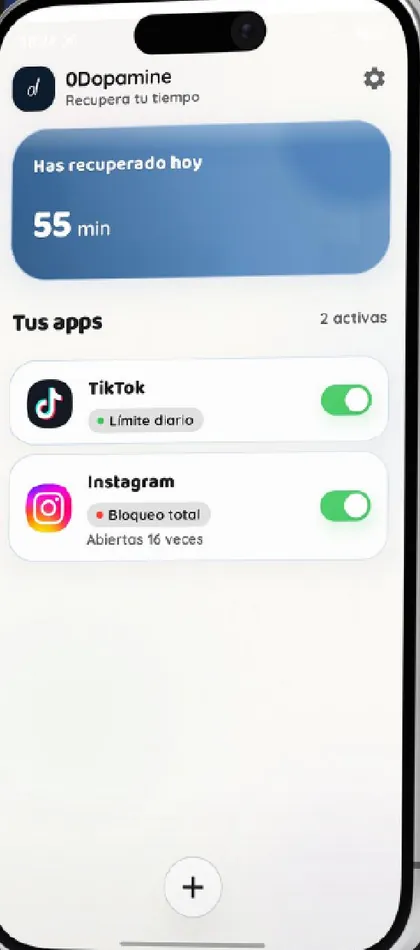
The home screen shows how much time you've won back each day and how many times you opened each app. Watching that number grow helps more than you'd think.
Is it free?
Yes: the free version controls one whole app with every mode, with up to 2 hours of blocking a day, so you can rein in TikTok without paying. Premium (€1/month, 7-day trial) removes that cap and adds unlimited apps and blocking Shorts and Reels inside YouTube, Instagram and other apps.
Quick questions
Can I use it to control my kid's TikTok?
0Dopamine is a self-control tool, not parental control: whoever uses the phone can turn it off. For children, TikTok's Family Pairing or Google Family Link are a better fit.
Does it work with TikTok Lite?
You can add any installed app and give it a pause, limit, schedule or full block.